This post records my experience using the VS Code Agents Window + OpenSpec workflow.
VS Code's Agents Window shipped on May 13, 2026, entering preview in the Stable channel with the VS Code 1.120 release.
My AI coding workflow at the moment is VS Code's editor window with Copilot Chat + OpenSpec. When the Agents Window first launched, the trial experience wasn't polished, so after an early taste I went back to Copilot Chat.
After June 1, 2026, the $10/month Copilot plan changed from 300 conversations per month to usage-based billing: 1,500 Credits per month, roughly $15 worth of tokens. Going from freely using Codex 5.3 Xhigh to a single exploratory session eating 20% of my monthly quota pushed me to switch entirely to custom models via the OAICopilot extension. At the time, the Agents Window only supported models from an official Copilot subscription, which gave me even less reason to use it.
On July 28, 2026, I accidentally opened the Agents Window while trying to click the VS Code title bar, and discovered it could now use the custom models I had configured through OAICopilot. As someone who loves experimenting, I naturally had to take a closer look - and that's how this post came to be.
Using OpenSpec in the Agents Window
Here I hit the first significant problem: the /opsx-xxx commands I used to run OpenSpec in the Copilot Chat window no longer worked in the Agents Window. Typing / there showed no /opsx-xxx commands from .github/prompts, only the /openspec-xxx ones from .github/skills
| Copilot Chat | Agents Window |
|---|---|
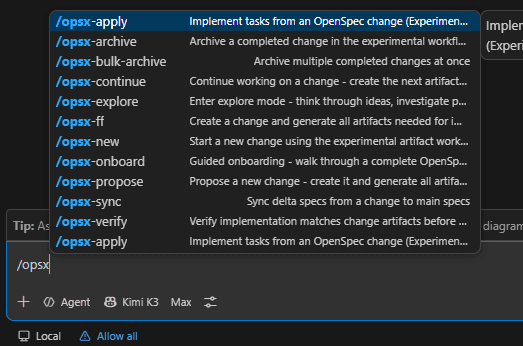 | 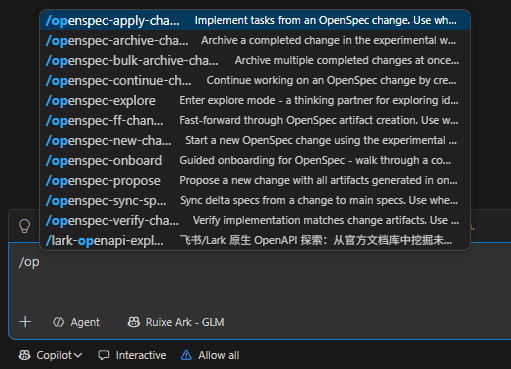 |
A search via Google's AI Mode revealed that the Agents Window no longer supports the old Prompts and recommends Skills instead. OpenSpec's setup generates the matching Prompts and Skills for the agent tool you pick in the CLI - that's how OpenSpec gets installed for an agent tool. For example, if you pick GitHub Copilot during installation, the OpenSpec CLI automatically creates prompt files under the project's .github directory and initializes the openspec directory. And since the CLI and prompt versions must match, there's no way to install it directly as an Agents extension.
After exploring, I found that opsx-xxx.prompt.md under .github/prompts and the openspec-xxx-xxx skills under .github/skills are very similar - nearly identical content, sometimes even more complete - so these skills work directly in the Agents Window, and you can also invoke one explicitly with /openspec-xxx-xxx.
Building Post Search for My Blog in the Agents Window
I'm currently building my personal blog, so I decided to try implementing post search with the OpenSpec workflow in the Agents Window and get a feel for the experience.
Exploring and Creating an OpenSpec Change
I entered the following in the Agents Window:
/openspec-explore
Explore the current project, outline the implementation plan, and list the questions that need decisions. Do not create an OpenSpec Proposal yet.

Following the content of `my-first-blog-website.md`, implement the feature: post search
After two or three rounds of exploration chats and answering a few decision questions, I used the openspec-propose skill to create the OpenSpec change proposal add-post-search.
While using the Agents Window, I found it supports remote control of Copilot Agents: local agent sessions sync to the GitHub cloud in real time, and from the GitHub website or the mobile app you can pick option answers or send new prompts. I still haven't figured out what the remote session access toggle in the top-right corner of the Agents Window does - toggling it on or off doesn't seem to affect real-time session syncing or sending prompts remotely.
Implementing the OpenSpec Change
In a new chat, I used openspec-apply-change to implement the proposal we had just created. The task was fairly complex, so I split it across separate chats.
Following the contents of task.md, I entered the prompt below:
/openspec-apply-change add-post-search

Please complete only the following tasks:
1. Dependencies and infrastructure
2. Server-side search index
3. Client-side search Context
The later steps followed the same pattern - splitting a complex task across multiple chats prevents a single conversation from accumulating too much context and hurting generation quality.
I also discovered another Agents Window feature: the left sidebar is a list of sessions, with session details in the middle and on the right. One session can contain multiple chats, and code changes across chats are managed together by the session - unlike Copilot Chat, where one conversation is one session.
Wrapping Up the OpenSpec Change
After implementing the feature with OpenSpec's apply workflow, I verified the change, synced the specs, and archived it.
In a new chat I verified the change: fix anything found at CRITICAL or WARNING level, and handle SUGGESTION-level findings case by case.
/openspec-verify-change add-post-search
In another new chat, sync and archive the change:
/openspec-sync-specs add-post-search
/openspec-archive-change add-post-search
Code Review in the Agents Window
After committing, pushing to a remote branch, and opening a PR, you can use the Agents Window's Code Review feature to review the changes automatically.
Above the code-changes view on the right side of the Agents Window sits a Run Code Review button. Clicking it automatically opens a new chat and sends /code-review, invoking the built-in Code Review skill - something Copilot Chat in the VS Code editor doesn't have, and it's convenient to use.
I once enabled PR-triggered cloud agent code review for GitHub Copilot, but the quality of the responses was mediocre and it burned quite a few token credits, so I turned it off.
Now I can run Code Review locally in the Agents Window with my custom models, and for frontend projects it can even drive the built-in browser for Playwright E2E tests automatically (though it is fairly token-hungry).
After the review finishes, you can look through the generated code comments, edit or delete them, and then use /act-on-feedback in the chat to apply the changes automatically.
Overall Impressions of the Agents Window
Overall, the Agents Window is a decent experience - it sits somewhere between IDE + agent chat products (VS Code, JetBrains IDEA, etc.) and pure vibe-coding agent products (Codex, Claude Code, etc.).
But plenty of bugs still hurt the experience, probably the result of heavy vibe coding without rigorous testing. Here are the bugs I hit in the Agents Window on VS Code 1.130.0
- I must first launch the VS Code editor window and wait for the OAICopilot extension to load before opening the Agents Window; opening the Agents Window alone leaves custom models unavailable.
- Clicking the
Create Pull Requestbutton does nothing - the button isn't disabled, but nothing happens and there's no error either. I expected a Claude Code Desktop-style one-shot PR workflow: commit + push + create PR. After some searching, it turns out I have to commit and push the code myself first. - After running Code Review, clicking the button to submit agent comments does nothing - same story.
- After restarting the window, the action buttons in the top-right change: sometimes
Create Pull Request, sometimesRun Code Review, sometimes something else.
I hope these issues get resolved and the experience polished. I'll probably keep mixing both modes - VS Code Copilot Chat and the Agents Window - so there may well be new impressions to share later.